Moving SANGE Studio to Next.js: architecture and three evenings to release
I migrated SANGE Studio from static HTML to Next.js between November 11 and 13, 2026, working about three to four hours after work each day. Existing URLs and content in 12 languages remain, while drafts, previews and publication can now be managed in a browser. Here is the architecture and the path to release, including an introduction to the Cloudflare services involved.
I migrated SANGE Studio from static HTML to Next.js between November 11 and 13, 2026, working about three to four hours after work each day. Existing URLs and content in 12 languages remain, while drafts, previews and publication can now be managed in a browser. Here is the architecture and the path to release, including an introduction to the Cloudflare services involved.
Why migrate?
The old website used HTML, CSS, JavaScript and Python page-generation scripts. These prebuilt pages already served app introductions, legal documents and articles. However, changing an article also meant keeping listings, translations and the sitemap consistent. With 12 languages, there was a lot to check.
I separated article data from page rendering and moved blog content to a database. The intended workflow is simple: write, save a draft, check its appearance, then publish.
What Next.js does
Next.js is a framework for building React web applications. It provides the public pages and administration interface. The server reads article data and returns HTML containing the text, a method called server-side rendering (SSR). Readers keep using the same URLs; the editor manages drafts and publication states instead of individual HTML files.
The Cloudflare services and their roles
Cloudflare provides website delivery and protection, application execution and storage. This site combines four services.
Workers: running application code
Cloudflare Workers runs code on Cloudflare's network. Rather than provisioning a machine and maintaining its operating system, I use managed execution infrastructure. Workers retrieves articles, generates pages and processes editing requests.
D1: articles and translations
Cloudflare D1 is a database: a place to organize information and retrieve it by conditions. It stores titles, text, languages, drafts, published versions and history. It can return the published English posts or the Japanese version of a specific article.
R2: uploaded image files
Cloudflare R2 stores files. D1 holds article information; R2 holds images uploaded through the editor. Existing images and CSS continue to be delivered as static files.
Access: restricting administration
Cloudflare Access controls who can enter a web application. Reading public articles requires no login; editing does. The application also validates authentication and save requests.
How the components connect
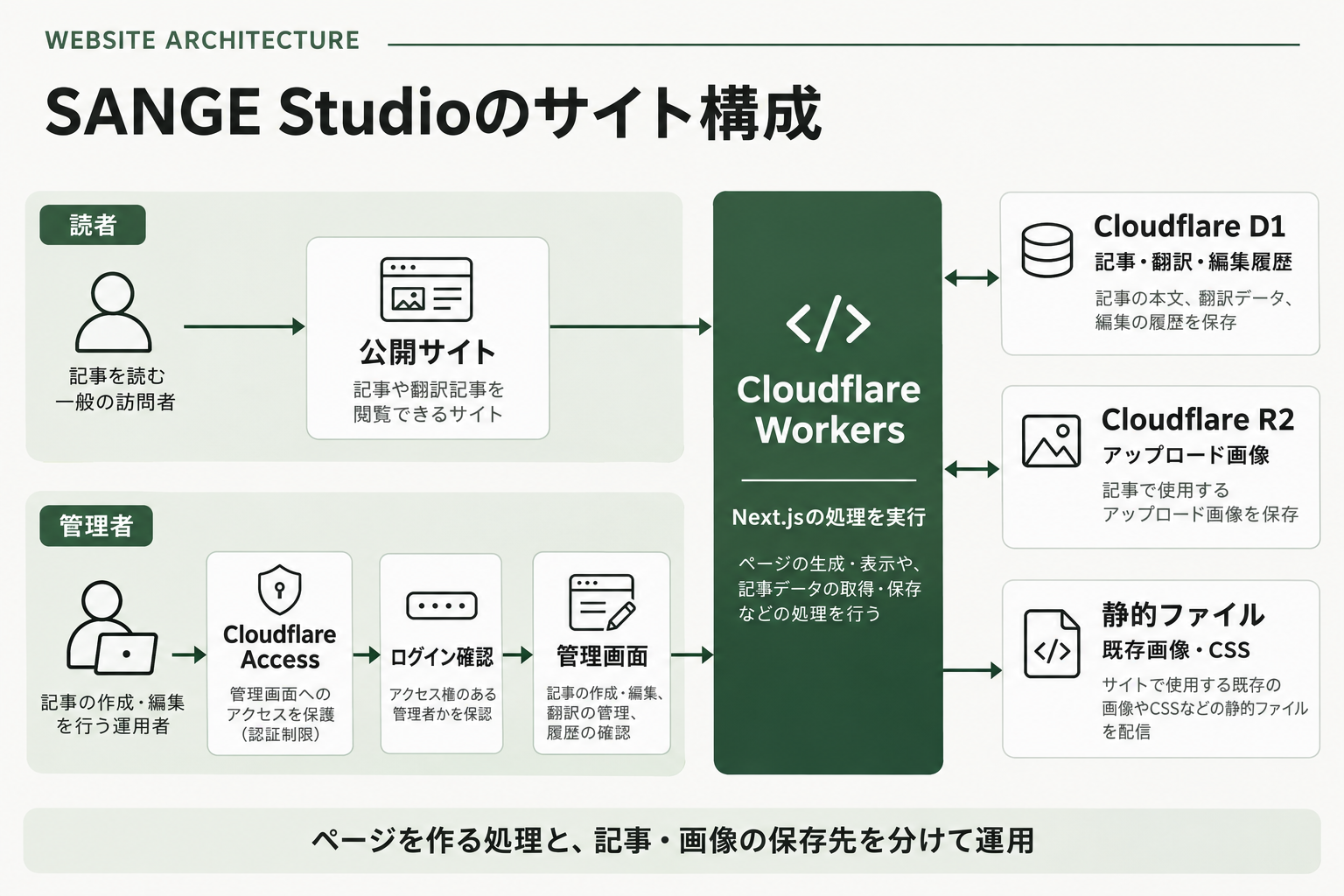
The diagram is the Japanese original. Readers enter the public site; editors pass through Access. Both interfaces use Workers, connected to D1 for articles, R2 for uploaded images and static files for existing assets.
Opening an article makes Workers retrieve the published text from D1 and return a page. Images come from static files or R2. Editing requests pass through Workers to D1 after login through Access.
OpenNext packages Next.js for Workers. Not every page moved into the database: app introductions and legal pages use data extracted from the previous HTML and remain maintained through Git, a version-control system. Blog editing is the main new browser-based workflow.
Separate drafts and publication
The editor supports posts, drafts, previews, publishing, translations and images. Saving a draft does not change what readers see. Publication switches the public version after review. History is retained, and an earlier version can become a new draft. Each language has its own draft and publication state.
Bodies support HTML and Markdown, with a formatted view for headings, images and tables, source editing and a preview of saved content.
Time spent
The work took place over three days, November 11–13, 2026, at about three to four hours per evening: roughly nine to twelve hours total. This is an estimate rather than a stopwatch measurement. Existing articles, translations, images and design were reused; it was not a website built from scratch. Individual stages were not timed.
| Date | Main work |
|---|---|
| November 11 | Existing site and multilingual data review; architecture design |
| November 12 | Public pages, editing interface and local checks |
| November 13 | Production preparation, release, administration separation and verification |
Eight steps to release
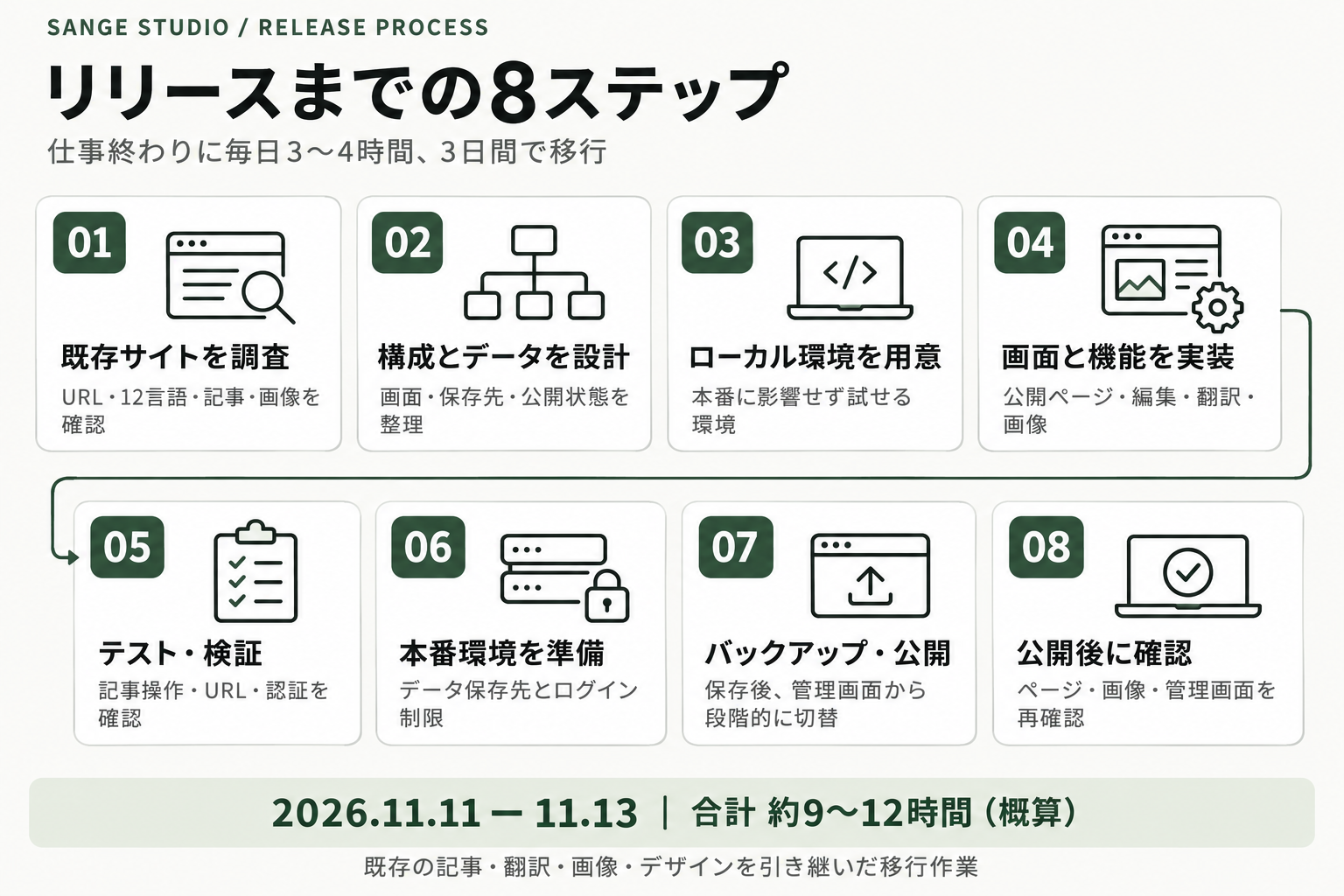
The Japanese diagram summarizes the steps described below.
1. Inventory the existing site
I checked 300 public URLs, 404 pages in 12 languages and seven articles with 84 language versions. URLs, text, images and search-engine metadata became the migration checklist.
2. Design the architecture and data
D1 would hold articles and translations, R2 uploaded images and Workers application logic. Drafts, published versions, history and per-language states were defined, separating save from publish.
3. Prepare a local environment
Docker Compose provided an environment separate from production. Docker runs applications together with their required environment. Saves and uploads could be tested without changing live articles. Development used Windows, with production builds on Linux.
4. Implement pages and editing
Existing content was imported and display, editing and publication implemented. Headings, images, tables and language-specific pages were preserved. Existing links and bookmarks remained usable, and legacy language-selection URLs received redirects.
5. Test and check staging
Automated and staging checks covered saves, publication, translations, uploads, URLs, languages, text and the sitemap. Unauthorized operations had to be rejected, and drafts had to leave published content unchanged.
6. Prepare production storage and authentication
Production D1 and R2 resources were separate from testing. Existing articles were imported, Access restricted administration, and authentication was tested against the production build.
7. Back up and release in stages
Data was backed up and checked. Administration was connected and tested first, then the public site was switched to the new Worker. The previous delivery configuration was retained for rollback. Administration was subsequently moved to a dedicated domain.
8. Verify live URLs
After release I checked pages, localized 404s, canonical URLs, the sitemap, images, database connectivity and administration protection. Node.js and build dependencies were then updated, rebuilt, tested and deployed. Verification again covered 300 public URLs and 61 static assets.
What changed and what remains to measure
The blog now has browser-based editing while keeping its multilingual content and URLs. Drafts, translations, images and published versions can be managed together. Search ranking and speed effects still require measurement: the old site already delivered article text in HTML. The concrete change is the editing workflow and data management.
Managed infrastructure does not remove responsibility for application updates, permissions or backups. I will refine the editor as I use it for new articles and translations.
Based on the architecture and migration records as of November 13, 2026. Service descriptions link to official Cloudflare documentation.
Comments 0
This does not identify nationality or residence. VPNs may affect it.
Nothing here yet.